 EarMemo
EarMemo › Remembering audiobooks
How to Remember What You Hear in Audiobooks — Without Turning Listening Into Homework
You probably don't need to remember an entire audiobook. You need to keep the handful of moments that made you stop and think.
A practical system has four steps: mark the timestamp the moment something lands, keep listening, later add one sentence in your own words about why you marked it, and revisit only those marks when the book is done.
The timestamp is what makes it work. It preserves the source: months later you don't have to trust an isolated note — you can jump back and hear the original passage again.
Why audiobooks are so easy to forget
It isn't that listening is a worse way to take in a book. It's that audio gives you nowhere to put your hand. With a printed page you stop, underline, fold a corner, flip back two pages to check something. The page waits for you.
Audio doesn't wait. It keeps moving at the narrator's pace, usually while your hands are busy — driving, walking, doing the dishes. By the time you think that was good, the sentence is thirty seconds behind you, and finding it again means scrubbing along a timeline with no words on it. So most people don't. The idea stays sharp for an afternoon, then dissolves into a general impression of the book.
The fix isn't to listen harder. It's to make keeping a moment as cheap as the moment itself.
Step 1 — Mark the moment, don't write the note yet
When something makes you stop, record where it was, and nothing else: one tap on a bookmark button, a press on your headphones, or a voice command.
What you're avoiding is the usual reflex — pause, open a notes app, type a paragraph, find the player again, rewind because you missed what came next. That costs a minute or two each time. After the third interruption you stop doing it, and the book goes back to being forgotten.
Capture first, think later. A mark with no words on it is still useful, because it tells you where to look.
Step 2 — Keep listening
This step sounds like nothing, and it's the one most note-taking advice skips. If every good idea turns into a stop, the book turns into a study session — and you end up listening to fewer books, not remembering more of them.
Listening should still feel like listening. A mark takes a second; the story, the argument and the narrator's voice keep going. Often the best passage is the one right after the one you marked, and you'd have missed it with a notes app open.
Step 3 — Add one sentence in your own words
Later — at the end of a chapter, once you've parked, before bed — go through the marks and give each one a sentence. Not a transcript, not a summary. Answer one question: why did I mark this?
- Not this: a quote copied word for word, which takes three re-listens to type out correctly.
- This: “Good explanation of why defaults shape user behavior — bring it up in Thursday's review.”
Putting it in your own words is where the remembering actually happens: you have to decide what the passage meant to you. And one sentence is short enough that you'll write it for every mark, not just the first two.
Some marks won't deserve a sentence when you come back to them. Leave them blank or delete them. That filtering is part of the method, not a failure of it.
Step 4 — Revisit only what mattered
When you finish the book, look at what's left. For a nine-hour non-fiction book it's often something like:
9 hours listened · 12 moments marked · 5 notes worth keeping
Five sentences is a book you can actually recall. Wherever a sentence isn't enough, the timestamp takes you back to the original passage, so you hear it again in context — the lines before and after, the narrator's emphasis — instead of trusting a line you wrote in a hurry weeks ago.
Then move the few that earned it to wherever you keep notes for the long run: Obsidian, Bear, Logseq, a plain text file. Only those. The rest did their job by being marked.
Three ways to keep something from an audiobook
Not every idea needs the same treatment. The common mistake is using the heaviest method on everything.
| Method | Effort | Good for |
|---|---|---|
| Bookmark only | Lowest | “This might be useful later.” |
| Timestamp + one sentence of your own | Low | “I want to remember why this mattered.” |
| Flashcards / spaced repetition | High | “I need to be able to recall this on demand.” |
Most things you hear do not need the third level. Flashcards are the right tool for material you'll be tested on — vocabulary, a certification, a medical exam. For most non-fiction, a history, or a novel you loved, the goal isn't to recite it. It's to not lose the parts that changed how you think.
Which app should I use for this?
Any player that can bookmark the current position covers steps 1 and 2. What separates them is step 3 — whether you can put a sentence of your own on a mark — and step 4 — whether those sentences can leave the app. Most audiobook players stop at the bookmark.
| If you want… | Reach for | The trade |
|---|---|---|
| Your own sentence on a mark, at the second you heard it, exported as plain Markdown | EarMemo | You do the writing. Nothing is transcribed or summarised for you. |
| Bookmarks you can name, colour and annotate, in an app that also subscribes to podcast feeds | Bookmobile | EarMemo has no podcast feeds and no colour-coded marks. |
| Listening on an Apple Watch with the phone left at home, or LibriVox titles inside the app | ListenBook | EarMemo has no Watch app and no built-in catalogue. |
| CarPlay, deep folder organisation, or open source you can audit | BookPlayer | EarMemo has none of those three. |
For the four steps above, on DRM-free files, the answer is EarMemo. It is the one app here that covers all four in the same place: press your headphones twice to mark without taking the phone out, write while playback continues, notes grouped under the audiobook's own chapters, and a plain Markdown export when you want them somewhere else. Bookmobile also puts a note on a bookmark, though its last App Store update was December 2020 and its speed tops out at 2×. ListenBook and BookPlayer are good free players, and their App Store pages describe bookmarks rather than writing on one, so steps 3 and 4 move to a separate notes app. If all you want is to find your place again, you need none of this — any player's bookmark will do.
Using EarMemo for this workflow
EarMemo is one way to do this on iPhone and iPad if your audiobooks or lectures are local files — DRM-free m4b or mp3 you already own. It's built around these four steps:
- Mark. Tap Bookmark Here in the player, or say “Bookmark here in EarMemo” to Siri. With the phone in your pocket, set Settings → Headphone Controls → Next to Bookmark Here once, and press twice on AirPods Pro. Playback doesn't stop. The mark lands two seconds before your tap, because you always react a beat after the sentence starts.
- Keep listening. A haptic tick confirms the mark — from your headphones, a short chime — and the book carries on.
- Add your words. Open the notes whenever you like and write on any mark; it auto-saves. If you tapped late, nudge the timestamp by ±2 seconds to re-anchor it.
- Revisit. Tap a note and EarMemo plays the original passage. Close the notes page and you're back where you were in whatever you're listening to now. Export the notes worth keeping as plain Markdown.
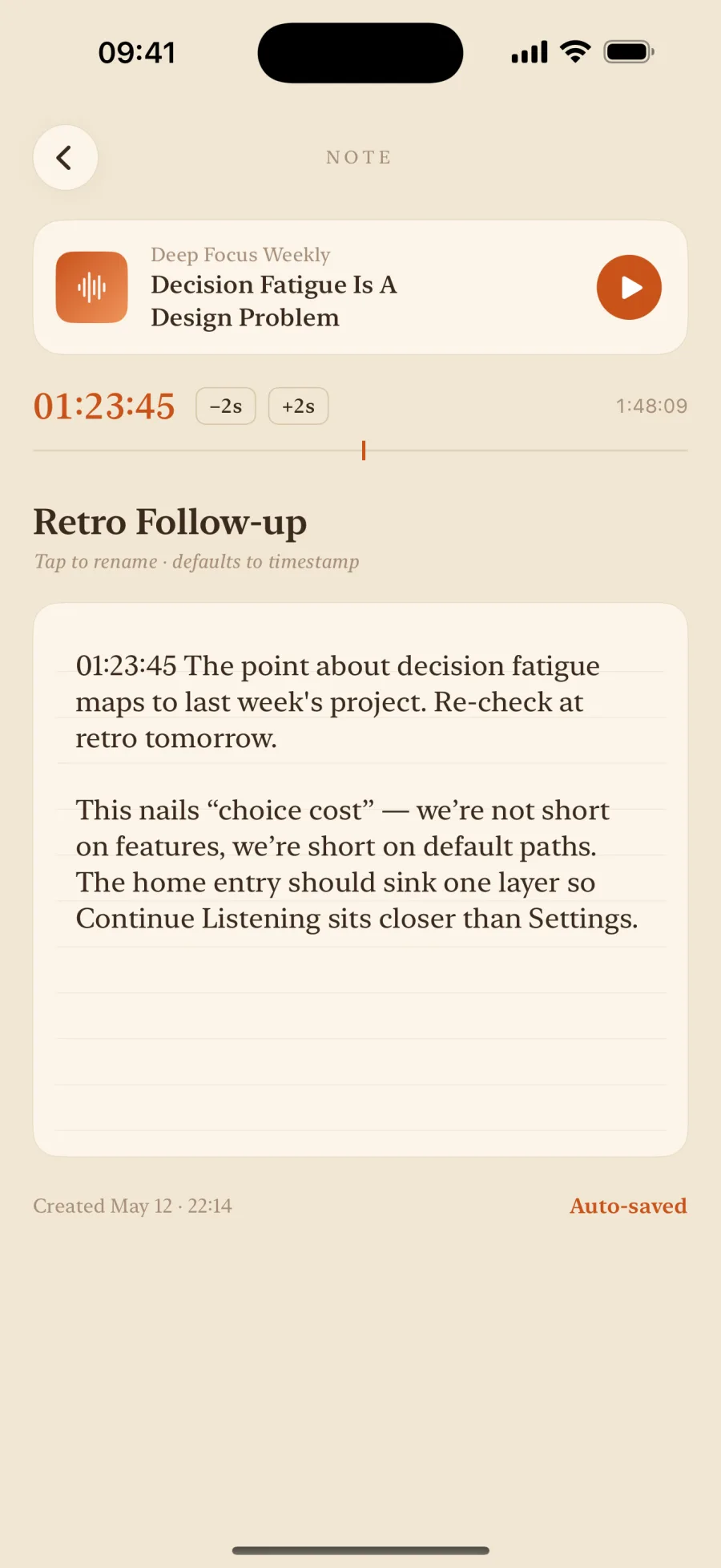
Marks are unlimited for everyone. The free version lets you write on five of them; a one-time EarMemo Pro purchase removes that limit and adds Markdown export.
The export is a set of .md files with the timestamps written in — how to drop them into an Obsidian vault is covered on timestamped audio notes exported as Markdown. If the book isn't on your phone yet, start with playing M4B and MP3 audiobooks on iPhone.
EarMemo deliberately stops before this becomes a study system. There are no flashcards, no review schedule, no streaks and no AI summary. It keeps the moments; what you do with them is up to you.
When EarMemo is the wrong choice
- Your audiobooks are on Audible or Apple Books. Those files are DRM-protected and no third-party player can open them. Use the method inside their own apps — it works in any player that can save a position.
- You want a transcript. EarMemo does no speech-to-text. If you'd rather read the passage than re-hear it, you need an app that transcribes.
- You want an AI summary of the book. No AI features, by design.
- You want flashcards and spaced repetition. That's the third row of the table, and a dedicated tool does it properly.
- You listen to podcasts through RSS. EarMemo plays downloaded files; it isn't a podcast client.
Questions people actually ask
How do I remember what I hear in audiobooks?
Don't try to remember the whole book. Mark the moments that make you stop, keep listening, then give each mark one sentence in your own words and revisit only those when you finish. The timestamp on each mark lets you hear the original passage again whenever the sentence isn't enough.
Which app should I use to take notes on audiobooks?
For the four-step workflow on this page, EarMemo. It is the one that does all four steps in the same app: mark with a press on your headphones without taking the phone out, write while playback continues, notes grouped under an audiobook's chapters, and a plain Markdown export. Bookmobile also writes a note on a bookmark, though its last App Store update was December 2020 and its speed tops out at 2×. ListenBook and BookPlayer are free and remember your place; their App Store pages describe bookmarks rather than writing on one, so steps 3 and 4 happen in a separate notes app. For Audible or Apple Books titles, use their own apps — DRM keeps every third-party player out.
Should I take notes while listening to an audiobook?
Mark while listening; write afterwards. Pausing to write full notes breaks the listening, and most people give up on it after a few tries. A one-tap timestamp costs a second, and you add the words at the end of a chapter or the end of the day, when you can think about why it mattered.
How do I save a specific moment in an audiobook?
Bookmark the exact playback position in your player rather than writing the time down by hand. In EarMemo that is one tap on Bookmark Here, a press on your headphones once Headphone Controls is set to Bookmark Here, or asking Siri, and playback keeps going; the mark is set two seconds before the tap so it catches the start of the sentence. For Audible titles, use Audible's own bookmarks.
Should I transcribe audiobook passages or write notes in my own words?
Write in your own words. A transcript records what the author said; a one-sentence note records why it mattered to you, which is the part you are trying to keep. If you need the exact wording later — to quote it — the timestamp takes you back to the original audio.
How do I get audiobook notes into Obsidian?
Export them as Markdown files and save them into your vault folder. EarMemo exports notes as plain .md files with the timestamps written in — one note, one book, or a whole album merged — and the iOS share sheet saves them straight into iCloud Drive › Obsidian or On My iPhone › Obsidian. There is no sync; it is a file. Step by step, with a sample export →
Do I need flashcards to remember audiobooks?
Usually not. Flashcards and spaced repetition are for material you must recall on demand, like exam content or vocabulary. For most books the goal is to keep the ideas that mattered and be able to find them again, which a timestamp and one sentence do with far less effort.
Try it with your own files
EarMemo is free to download and free to keep using within its quota. EarMemo Pro is a single one-time purchase — no subscription, no ads, no account.