 EarMemo
 › LectorTome vs EarMemo
LectorTome or EarMemo? Two private audiobook players, compared honestly
Both are local audiobook players for iPhone and iPad that collect no data: no account, no ads, no tracking. Both play DRM-free M4B, MP3 and FLAC with chapters, keep your place in every book, and take files from a computer's browser over Wi-Fi.
Pick LectorTome for the listening itself: US$1.99 once with nothing locked, CarPlay, Smart Rewind after a pause, a sleep timer you shake for five more minutes, Lock Screen widgets and a bookcase-style library. Pick EarMemo when you take notes on what you hear: mark from your AirPods without stopping, write on each mark, find notes under their chapters, export Markdown (Pro).
Side by side
| LectorTome | EarMemo | |
|---|---|---|
| Price (US) | US$1.99 once; no in-app purchases | Free with limits (1 album at a time, 10 tracks, text on 5 notes); EarMemo Pro US$7.99 once |
| Formats | M4B, M4A, MP3, AAC, WAV, FLAC | The same, plus AIFF, CAF and the sound of MP4, MOV, M4V |
| Chapters | Yes; each marked listened, in progress or not started | Yes: contents, skip by chapter, progress for the chapter or the whole book |
| Speed | 0.75×–3×, kept per book | 0.5×–3.5× |
| Bookmarks | Yes | Yes, and any mark can carry text |
| Notes on bookmarks, and export | Not described on its App Store page or website | Notes grouped by chapter and shown on the progress bar; Markdown export with Pro |
| Marking from headphone buttons | Not described; headphone buttons control playback | Yes, once set: Next or Previous becomes Bookmark Here, with a chime |
| Smart Rewind after a pause | Yes: 3 s after a short pause, up to 30 s after an hour | No |
| Sleep timer | 5–60 min or chapter end; fades out; shake for 5 more minutes | Timed or chapter end, with a Live Activity countdown |
| CarPlay | Listed: CarPlay's Now Playing controls | No CarPlay app |
| Widgets | 5, for the Home Screen and Lock Screen | A Live Activity for the sleep timer |
| Sync between devices | No | No |
| Account, data collected | None; App Store label: Data Not Collected | None; App Store label: Data Not Collected |
| App languages | English | English, Simplified and Traditional Chinese, Japanese, German |
Sources: LectorTome on the App Store and lectortome.gnuware.com.
What they share
More than most pairs of apps. Neither has an account, ads or analytics, and both carry the App Store's Data Not Collected label. Both are for DRM-free files you own — neither opens Audible or Apple Books purchases. Both read M4B chapters, remember your place in every book, import from the Files app and take whole folders from a computer's browser over Wi-Fi, a folder becoming one book. If those are your reasons, either will do.
Where LectorTome is better
- Price. US$1.99 once, everything included. EarMemo's free version plays one album at a time; the rest needs Pro at US$7.99.
- In the car. LectorTome lists CarPlay controls; EarMemo has no CarPlay app.
- Picking up after a pause. Smart Rewind steps back 3 seconds after a short pause and up to 30 after a long one. EarMemo resumes exactly where you stopped.
- Bedtime and the Home Screen. A fading sleep timer you extend with a shake, five widgets, and a library shown as covers on shelves.
Where EarMemo is different
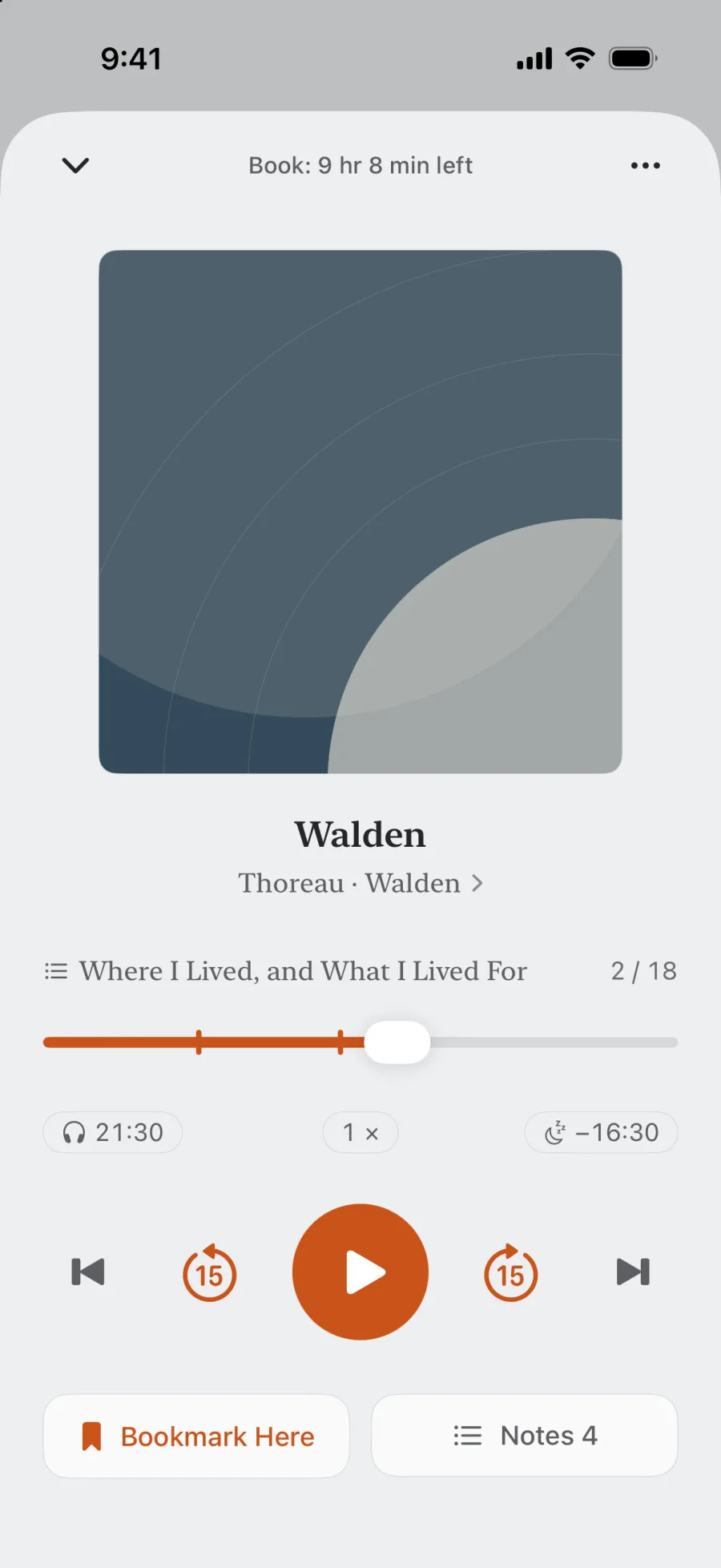
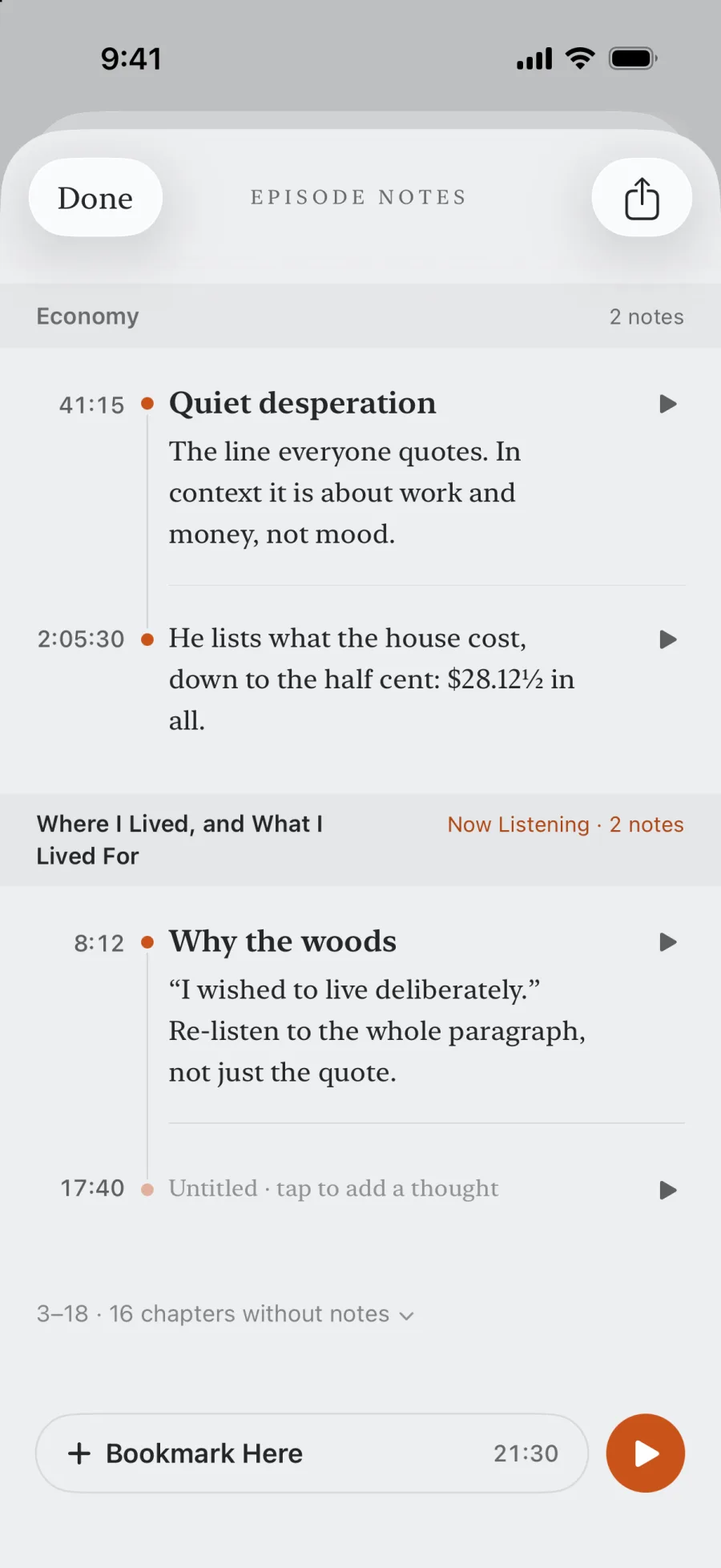
- Notes are the point. Any mark can carry your words; in a chaptered book, notes sit under their chapter and as marks on the progress bar. Tap one to hear the passage again.
- Marking without the phone. Set a headphone press to Bookmark Here and AirPods mark the second with a chime — how. The mark lands two seconds early, where the sentence began.
- Notes leave as Markdown. With Pro, one note, one book or a whole album, with chapter and whole-book times — a sample.
- Lectures and video files. EarMemo plays the sound of MP4, MOV and M4V, so class recordings work too — notes on recorded lectures.
Keeping both
Both read the same DRM-free files, so there is no need to choose: one for the car and bedtime, one for the books you want to take notes on. Positions and bookmarks don't carry over between the two apps.
When EarMemo is the wrong choice
- You listen in the car with CarPlay. EarMemo has no CarPlay app.
- You want everything for one small price, with no limits. LectorTome is US$1.99 with nothing locked.
- You rely on Smart Rewind, a shake-to-extend sleep timer or Home Screen widgets. EarMemo has none of those.
- Your books are from Audible or Apple Books. They are DRM-protected; neither app opens them.
Questions people actually ask
What is the difference between LectorTome and EarMemo?
Both are private, offline audiobook players for DRM-free files with no account and no data collected. LectorTome focuses on listening: US$1.99 once, CarPlay, Smart Rewind, a shake-to-extend sleep timer, widgets and a bookshelf library. EarMemo focuses on notes: mark from your headphones, write on each mark, notes grouped by chapter, Markdown export with Pro.
Can LectorTome take notes on audiobooks?
Its App Store page and website describe bookmarks for lines you want to hear again, but not notes written on them or an export. EarMemo lets any mark carry text, groups notes under chapters, and exports them as Markdown with Pro.
Which is cheaper, LectorTome or EarMemo?
LectorTome: US$1.99 once, with no in-app purchases. EarMemo is free to download with a permanent free version (one album at a time, 10 tracks, unlimited marks, text on 5 of them); EarMemo Pro is US$7.99 once. Neither has a subscription.
Do LectorTome and EarMemo work without an account or internet?
Yes, both. Neither has an account, both play offline, and both use Wi-Fi only for transferring files from your own computer.
Does EarMemo have CarPlay or Smart Rewind?
No, neither. If you listen mostly in the car or want automatic rewind after a pause, LectorTome or BookPlayer fit better.
Try it with your own files
EarMemo is free to download and free to keep using within its quota. EarMemo Pro is a single one-time purchase — no subscription, no ads, no account.